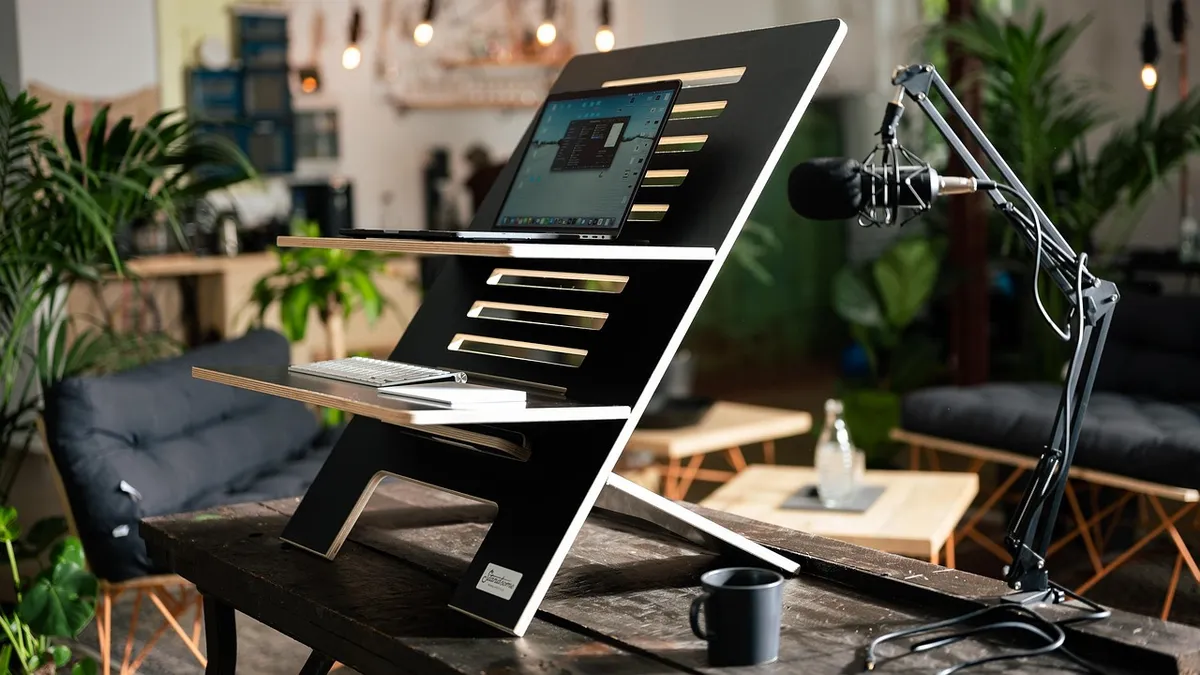
How to Choose a Standing Desk Converter: Buying Guide
To choose a standing desk converter, match three things to your own setup: the desk depth you have free behind the keyboard, the combined weight of your monitors and gear, and how many times a day you plan to change position. Use the decision table below to go from “my desk and monitors” straight to a converter type, weight capacity and lift mechanism, instead of reading generic pros-and-cons lists.
- Key takeaways
- Measure your desk depth first — most converters need 16″-24″ of clear space behind the keyboard, depending on monitor count.
- Add up your actual monitor, keyboard and mouse weight before checking a capacity spec. Don’t guess from a generic “30-50 lb” range.
- Electric (push-button) lifts cost more but help if you’ll change position several times a day; gas-spring or fixed-position converters work fine for one or two changes.
- Keyboard trays often carry a separate, lower weight limit than the main platform — check it if you plan to rest much weight there.
- As a rule of thumb (not a tested standard), look for a converter base depth that’s at least 70% of your desk’s depth to resist front-to-back wobble.
What types of standing desk converters are there?
There are three main platform styles: a riser platform that lifts a single tier holding your laptop or monitor, a full-surface converter with a wide platform plus a separate keyboard tray, and a monitor-arm style where the display sits on a clamp-on arm instead of the converter’s own platform. Each uses either an electric motor, a gas-spring (manual) lift, or fixed height positions.
This guide walks through the factors that decide which combination fits your desk. For a full side-by-side comparison of all three platform types, see our standing desk converter types guide.

How much desk depth do you need?
Depth — not width — is usually the limiting factor, because the converter sits on top of your existing desk and still needs room for your chair and elbows when seated. Measure from the back edge of your desk to where you normally sit, then subtract a couple of inches for clearance.
As a starting point: a single-monitor or laptop setup typically fits in 16″-20″ of depth. Two monitors on their own stands usually need 20″-24″. For comparison, real manufacturer platforms range from Uncaged Ergonomics’ CHANGEdesk at an 18″ x 25.25″ base to FlexiSpot’s AlcoveRiser M7 work surface at 28.3″ W x 16.3″ D — so “depth needed” varies a lot by model, and you should check the exact base dimensions on the product page, not just a category average.
If your desk is shallow, read our dedicated guide on sizing a converter for a small desk, which includes a step-by-step measuring worksheet.
How much weight capacity do you need?
Weight capacity is the combined load the platform (and, on some models, the keyboard tray) can safely hold. Manufacturer numbers vary widely: VersaDesk’s PowerPro electric converter is rated for 80 lbs, while Uncaged Ergonomics’ CHANGEdesk is rated for 30 lbs, and FlexiSpot’s AlcoveRiser M7 and Mount-It’s MI-7962 and MI-7927E are each rated around 37-44 lbs combined.
Only one model in our research, the Eureka Ergonomic 36″ converter, splits its 35-lb combined rating into a display surface (30 lbs) and a keyboard tray (5 lbs) — most other brands publish one combined number and don’t break out the tray separately. If you’re outfitting a dual-monitor setup, work through the full calculation in our weight capacity guide for dual monitors, which adds up real monitor weights against these capacities with a safety margin.
Electric or manual — which lift fits your routine?
Electric converters raise and lower with a button, which is faster and easier if you plan to switch position many times a day. Manual converters use a gas-spring mechanism and a release lever or handle; some, like the CHANGEdesk, use fixed positions instead of continuous height adjustment. Manual models are typically cheaper to buy and have fewer electrical parts to fail.
If you only plan to stand once or twice a day, the extra cost of an electric motor may not pay off. If you stand and sit in short bursts throughout the day, the convenience adds up. Our electric vs. manual comparison includes a break-even table based on how many transitions you make per day.
Do you need a keyboard tray?
A keyboard tray keeps your typing surface at a comfortable height separate from your monitor platform, but it adds depth to the converter’s footprint and, on several models, carries its own lower weight limit. Not every converter includes one, and not every desk has room for one.
If you type for long hours or have a deep desk, a tray is usually worth the extra footprint. If your desk is shallow or you mostly use a laptop, you may not need one. See our full keyboard tray decision guide for a breakdown by typing hours and desk depth.
How do you stop a converter from wobbling?
Wobble usually comes from a base that’s too shallow relative to the desk, uneven floor contact, or loose assembly bolts. There’s no converter-specific engineering standard with a published numeric ratio for this. As a general rule of thumb — not a tested ANSI/BIFMA figure — aim for the converter’s base depth to be at least 70% of your desk’s own depth, which keeps more of the load’s center of gravity over the base.
The ANSI/BIFMA X5.5 furniture standard does include a stability (tip-over) test for desks and tables, and a 2021 revision added a specific test for units with monitors attached, but the publicly available material does not state an exact base-depth ratio — so treat any specific percentage, including the 70% figure above, as a planning heuristic rather than a cited spec. For the full checklist, see how to stop a standing desk converter from wobbling.
Clamp-on or freestanding — which mount works with your desk?
Some converters clamp to the back edge of your desk; others simply sit on top as a freestanding unit. Clamp-on styles need a certain edge thickness and clearance behind the desk, and won’t work on desks with a thick apron, a hutch, or drawers in the way. Freestanding units work on almost any flat surface but take up the full footprint on the desktop itself.
Check your desk’s edge profile and rear clearance before buying a clamp-on model. Our mounting compatibility guide has the full checklist.
Is a standing desk converter the right choice, or should you get a full desk?
A converter sits on an existing desk and is usually the cheaper, faster option; a full height-adjustable desk replaces the desk entirely and gives you more total surface area. If you’re not sure which makes sense for your budget and space, our converter vs. full desk comparison includes a cost-over-time table.
Putting it together: the decision table
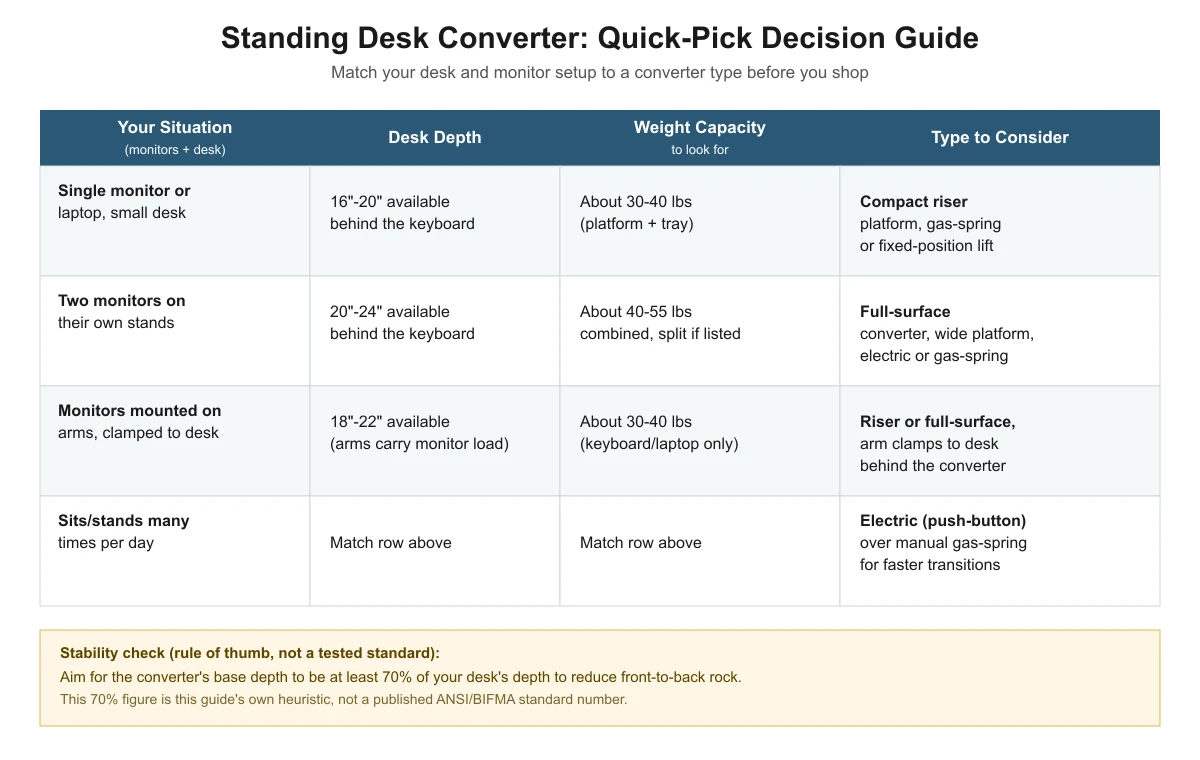
The graphic below summarizes the factors above into one quick-reference guide. The same data appears in the table underneath it, since search engines and AI assistants can’t read text inside an image.
| Your situation | Desk depth needed | Weight capacity to look for | Type to consider |
|---|---|---|---|
| Single monitor or laptop, small desk | 16″-20″ available behind the keyboard | About 30-40 lbs (platform + tray) | Compact riser platform, gas-spring or fixed-position lift |
| Two monitors on their own stands | 20″-24″ available behind the keyboard | About 40-55 lbs combined, split if listed | Full-surface converter, wide platform, electric or gas-spring |
| Monitors mounted on arms clamped to the desk | 18″-22″ available (arms carry the monitor load, not the platform) | About 30-40 lbs (keyboard/laptop only) | Riser or full-surface, arm clamps to desk behind the converter |
| Sits and stands many times per day | Match the row above for your monitor setup | Match the row above for your monitor setup | Electric (push-button) over manual gas-spring, for faster transitions |
Depth and weight ranges above are this guide’s planning estimates based on the manufacturer specs cited throughout this article, not a single published industry standard. Always check the exact base depth and weight rating on the specific model’s product page before buying.
Frequently asked questions
Can a standing desk converter sit on any desk?
Most freestanding converters work on any flat, stable desk surface deep enough to hold the base. Clamp-on converters are more limited — they need a specific edge thickness and clear space behind the desk, so check your desk’s edge profile first.
Do standing desk converters work with dual monitors?
Yes, but check the weight capacity against your actual monitor weights, and make sure the platform is wide enough for both stands or that you’re using monitor arms instead. Our width guide for dual-monitor setups covers sizing in detail.
How long do standing desk converters typically last?
According to AOHRS, a workplace-safety resource site, sit-stand converters average a 5-8 year lifespan versus 10-15 years for a full standing desk, though this is a secondary estimate rather than government or independent lab data. See our converter vs. full desk comparison for the full cost breakdown.
Is an electric standing desk converter worth the extra cost?
It depends on how often you change position. If you stand and sit several times a day, the push-button convenience usually pays off. If you set it once in the morning and leave it, a manual gas-spring model saves money without much downside.
Sources
- VersaDesk PowerPro product page — weight capacity and platform size
- FlexiSpot AlcoveRiser M7 product page — weight capacity and work surface dimensions
- Mount-It MI-7962 product page — weight capacity and platform size
- Uncaged Ergonomics CHANGEdesk product page — weight capacity, base footprint and fixed height positions
- Eureka Ergonomic 36″ converter spec page (authorized dealer) — split platform/tray weight capacity
- Eureka Ergonomic blog on ANSI/BIFMA X5.5 testing — existence of the stability/tip-over test, general furniture standard
- AOHRS: Standing Desks vs. Sit-Stand Converters — cost and lifespan estimates
deskconverterguide.com Editorial Team
Last updated: November 13, 2026




3 thoughts on “How to Choose a Standing Desk Converter: Buying Guide”