
Standing Desk Converter vs. Full Standing Desk: Which to Buy
A standing desk converter sits on top of your existing desk and costs less upfront, while a full standing desk replaces the whole desk, lasts longer, and gives you more total surface area. According to AOHRS, a workplace-safety resource site, converters typically cost $150-$500 and last 5-8 years, versus $400-$1,500+ and 10-15 years for a full desk — so the better buy depends on your budget, how long you’ll keep it, and how much surface area you actually need.
- Key takeaways
- A converter is usually the cheaper upfront option and needs no assembly of a whole new desk.
- A full standing desk costs more but lasts longer, per the only cost/lifespan estimate we could verify (AOHRS, a workplace-safety resource site, not government data).
- Converters eat into your existing desktop space; full desks give you one continuous surface.
- If you rent, move often, or aren’t sure you’ll stand regularly, a converter is the lower-commitment choice.
- No neutral third-party source (Consumer Reports, BLS, FTC) publishes converter-vs-desk cost data — AOHRS is the only source we found, and it’s flagged below as a secondary estimate.
What’s the real difference between a converter and a full desk?
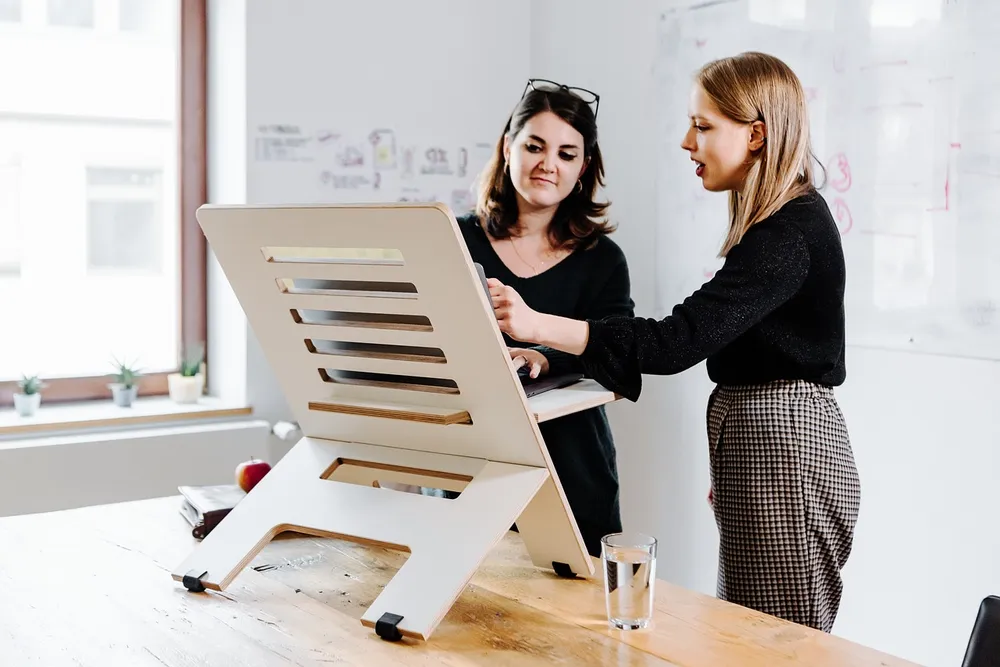
A standing desk converter is a platform — with or without a keyboard tray — that sits on top of a desk you already own and raises your laptop or monitor to standing height. A full standing desk is a separate desk whose entire surface, including the legs, raises and lowers. You don’t need a converter at all if you already have a full standing desk, and you don’t need a new desk if a converter fits on the one you have.
For the different converter platform styles available, see our types comparison guide. If you’ve already decided a converter makes sense, our buying guide walks through picking the right one.
How do the costs compare over time?
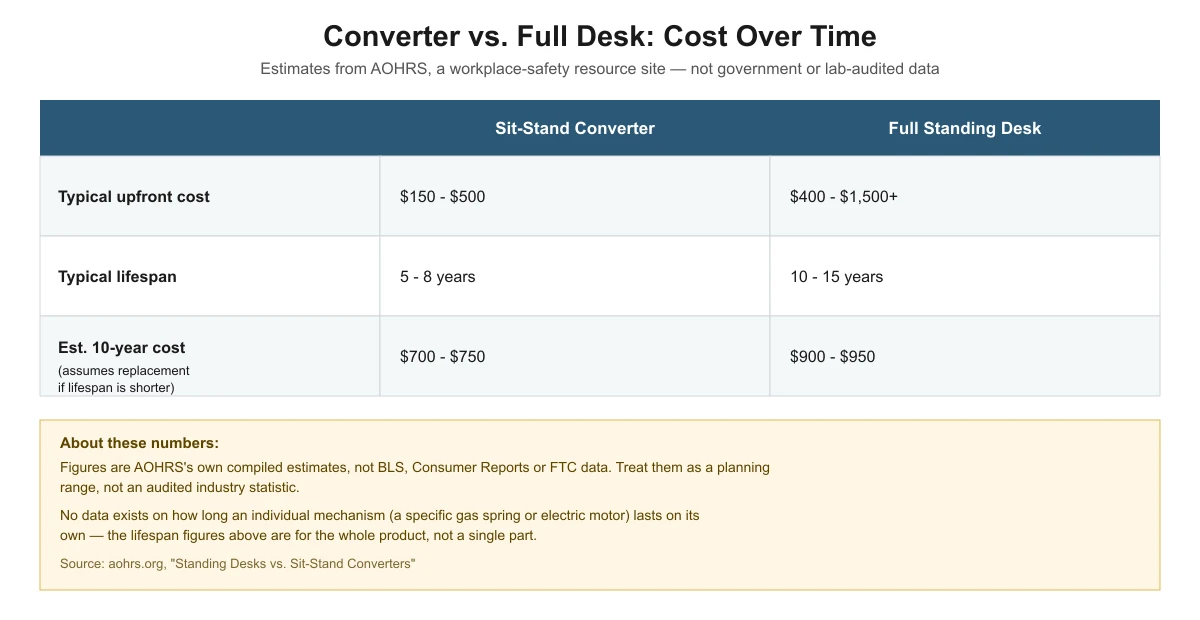
According to AOHRS (Academy of Occupational Health & Risk Sciences), a workplace-safety resource site rather than a government or independently audited source, sit-stand converters typically cost $150-$500 upfront and last 5-8 years, with an estimated 10-year cost of ownership of $700-$750 if you need one replacement in that period. Full standing desks typically cost $400-$1,500+ upfront, last 10-15 years, and have an estimated 10-year cost of ownership of $900-$950.
| Sit-stand converter | Full standing desk | |
|---|---|---|
| Typical upfront cost | $150 – $500 | $400 – $1,500+ |
| Typical lifespan | 5 – 8 years | 10 – 15 years |
| Estimated 10-year cost of ownership | $700 – $750 | $900 – $950 |
These figures come from a single workplace-safety resource website’s compiled estimate, not an audited industry statistic — we could not find BLS, Consumer Reports, or FTC data covering this specific comparison. We also found no data on how long an individual mechanism, such as one specific gas spring or electric motor, lasts on its own; the lifespan numbers above describe the whole product, not a single part. Treat them as a planning range, and re-check pricing against current retail listings before budgeting.

What do you give up with a converter?
A converter uses part of your existing desktop, so you lose some flat surface space even while seated, and the platform itself adds a few inches of height once it’s lowered. Weight capacity is also more limited: real converter models we checked range from 30 lbs (Uncaged Ergonomics CHANGEdesk) up to 80 lbs (VersaDesk PowerPro), and most don’t separate keyboard tray capacity from the main platform. For specifics on matching capacity to your monitors, see our weight capacity guide.
A full desk doesn’t have these footprint or capacity trade-offs in the same way, since its entire surface moves together and is typically built for a wider spread of monitors and accessories.
How much surface area and width do you actually get?
Converter platform widths are fixed by the model you buy. VersaDesk’s PowerPro, for example, is sold in 36″, 40″ and 48″ wide versions, and FlexiSpot’s AlcoveRiser M7 work surface measures 28.3″ wide by 16.3″ deep. Whatever width you pick is the full usable surface for your monitor, keyboard and anything else on the platform — there’s no room to add a printer or notebook beside it without going off the platform entirely.
A full standing desk’s surface is typically the same size as the fixed desk it replaces, often considerably wider than a converter platform, so it has room for a printer, a notepad or a second device next to your monitor setup without crowding the keyboard area. If your work involves spreading out paperwork or multiple devices at once, that extra surface is a real day-to-day difference, not just a specification on a page.
Who should still buy a converter instead of a full desk?
- Renters or frequent movers — a converter travels with you and needs no desk replacement when you relocate.
- Shared or hot-desk setups — a converter can be added to a desk you don’t own or can’t modify.
- Anyone testing whether they’ll actually use a standing desk — lower upfront cost means less risk if you stop using it.
- Tight budgets right now — a converter’s lower upfront cost (per the AOHRS estimate above) spreads out the investment.
- Desks you’re happy with otherwise — no reason to replace a desk whose material, size and look you already like.
Who should buy a full standing desk instead?
If you want one continuous surface with no platform eating into your workspace, plan to keep the desk for many years, or need a wider surface than a converter platform can offer, a full desk is usually the better long-term buy — especially given the longer typical lifespan AOHRS reports (10-15 years vs. 5-8 years for a converter).
Frequently asked questions
Is a standing desk converter worth it if I’m not sure I’ll use it?
Yes — the lower upfront cost (AOHRS estimates $150-$500 versus $400-$1,500+ for a full desk) makes a converter a lower-risk way to try standing while working before committing to a full desk.
Do standing desk converters damage my existing desk?
Freestanding converters just rest on the desktop and shouldn’t cause damage. Clamp-on converters grip the desk’s back edge, so check the edge material and thickness first — see our mounting compatibility guide for the details to check.
Can I fit a converter on a small desk if I decide against a full desk?
Often yes, but depth is the limiting factor. Our small-desk depth guide has a measuring worksheet to check fit before buying.
Why not just buy the cheapest option of either type?
Cheap converters and cheap full desks can both have lower weight capacity and shorter real-world lifespans than the averages above. Match capacity to your actual monitor and accessory weight (see our weight capacity guide) rather than buying on price alone.
Sources
- AOHRS: Standing Desks vs. Sit-Stand Converters — upfront cost, lifespan and 10-year cost of ownership estimates
- VersaDesk PowerPro product page — converter weight capacity (high end)
- Uncaged Ergonomics CHANGEdesk product page — converter weight capacity (low end)
deskconverterguide.com Editorial Team
Last updated: November 13, 2026



One thought on “Standing Desk Converter vs. Full Standing Desk: Which to Buy”