
Standing Desk Converter Types: Riser vs. Arm vs. Surface
There are three real standing desk converter types: a compact riser platform, a wide full-surface converter with a keyboard tray, and a monitor-arm style setup where the display sits on its own clamp-on arm instead of the converter’s platform. Each gives up a different amount of desk space, supports a different number of monitors, and carries a different weight rating — the comparison table below lines them up side by side.
- Key takeaways
- A “monitor riser” (a fixed, non-adjustable stand, often $15-$40) is not the same product as a height-adjustable standing desk converter — don’t confuse the two when shopping.
- Riser platforms keep the most desk space free but usually support only one laptop or monitor.
- Full-surface converters add a dedicated keyboard tray but take up most of the desk’s usable depth.
- Monitor-arm style setups free up the most space of all, but the arm’s weight rating is separate from the converter platform’s rating — check both.
- Real models vary a lot: weight capacity alone ranges from 30 lbs (Uncaged Ergonomics CHANGEdesk) to 80 lbs (VersaDesk PowerPro).
What’s the difference between a “monitor riser” and a standing desk converter?
Many search results mix up two different products. A monitor riser is a small, fixed-height stand that just raises a screen a few inches for better eye level — it doesn’t adjust for sitting or standing and typically costs $15-$40. A standing desk converter is height-adjustable across a much bigger range, letting you go from a seated typing height to a full standing height. This article covers converters, not fixed monitor risers.
Riser platform: compact and simple
A riser platform is usually two stacked tiers — one for your laptop or monitor, one lower tier for the keyboard — that lift together as a single compact unit. The Uncaged Ergonomics CHANGEdesk is a real example: it has an 18″ x 25.25″ base, a 30-lb weight capacity, and five fixed height positions (4.1″, 10″, 15.4″, 18.75″ and 21.25″) set by a gas-spring-assisted mechanism rather than continuous electric height adjustment.
Because the footprint is small, this style leaves the most desk space free for other things, but it usually supports only one monitor or laptop at a time, and fixed-position models like the CHANGEdesk don’t let you fine-tune the exact height the way a continuous lift does.
Full-surface converter: more room, more capacity
A full-surface converter uses one wide platform plus a separate keyboard tray, giving more room for a monitor (or two) and other items. Real examples include VersaDesk’s PowerPro (electric, sold in 36″, 40″ and 48″ wide versions, rated for 80 lbs), FlexiSpot’s AlcoveRiser M7 (gas-spring, 28.3″ W x 16.3″ D work surface, rated for 37.4 lbs combined), and Mount-It’s MI-7962 and MI-7927E (both electric, platforms around 35-48.5″ wide, each rated for 44 lbs combined).

Only one model in our research, the Eureka Ergonomic 36″ converter, splits its 35-lb combined rating into a 30-lb display surface and a 5-lb keyboard tray — most full-surface converters, including the ones above, publish one combined number instead. This style takes up most of the desk’s usable depth, so measure carefully first; see our small-desk depth guide before buying one for a shallow desk.
Monitor-arm style: the most desk space freed
In this setup, the converter platform carries only the keyboard and mouse, while the monitor sits on its own VESA-compatible arm clamped to the desk (or, on some converters, to the platform’s frame). This frees up the most desk space of the three types, since the monitor’s weight and footprint move off the platform entirely.
The arm’s own weight rating matters here, separate from the converter’s platform rating. Ergotron’s LX Desk Mount LCD Arm, for example, is rated for 7-20 lbs per arm for monitors 24″ or less, with 100x100mm or 75x75mm VESA mounting. Ergotron also sells heavier-duty variants for larger screens, but we could only verify this specific 24″-and-under rating directly — re-check the exact model’s rating before buying if your monitor is larger.
Side-by-side comparison
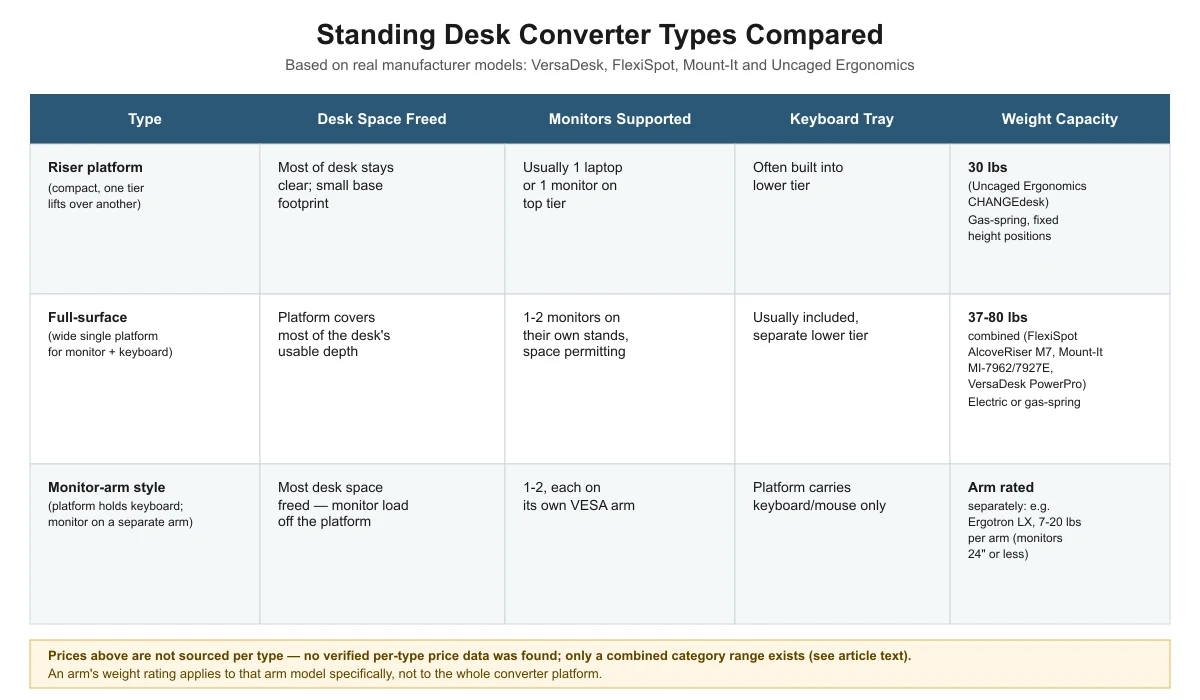
| Type | Desk space freed | Monitors supported | Keyboard tray | Weight capacity (real models) |
|---|---|---|---|---|
| Riser platform | Most of desk stays clear; small base footprint | Usually 1 laptop or monitor on top tier | Often built into lower tier | 30 lbs (Uncaged Ergonomics CHANGEdesk) |
| Full-surface converter | Platform covers most of the desk’s usable depth | 1-2 monitors on their own stands, space permitting | Usually included, separate lower tier | 37-80 lbs combined (FlexiSpot AlcoveRiser M7, Mount-It MI-7962/7927E, VersaDesk PowerPro) |
| Monitor-arm style | Most desk space freed — monitor load off the platform | 1-2, each on its own VESA arm | Platform carries keyboard/mouse only | Arm rated separately, e.g. Ergotron LX: 7-20 lbs per arm (monitors 24″ or less) |
No verified per-type price data was found — manufacturer pages we checked list specs, not consistent pricing, and the only cost range we could source (AOHRS’s $150-$500 estimate) covers converters as a category, not broken out by type.
Which type should you choose?
If desk space is tight and you work mostly from a laptop, a riser platform is the simplest fit. If you run one or two monitors and want a built-in keyboard tray, a full-surface converter gives you the most room on the platform itself. If you already use or plan to add a monitor arm and want to free up as much desk space as possible, a monitor-arm style setup does that — but you’ll need to check the arm’s weight rating separately from the converter’s. For a full walkthrough of matching your desk and monitors to a type, see our buying guide.

Frequently asked questions
Can I add a monitor arm to any standing desk converter?
Many full-surface and riser converters have a flat platform wide enough to also hold a clamp-on monitor arm base, but check the platform’s own depth and the arm’s clamp requirements before combining the two — the arm’s clamp still needs desk edge access in most designs.
Do fixed-position converters like the CHANGEdesk limit ergonomics?
Fixed positions mean you pick from a set number of heights rather than any exact height. The CHANGEdesk offers five positions (4.1″ to 21.25″), which covers a wide range, but you can’t fine-tune between those steps the way a continuous electric or gas-spring lift allows.
Which type needs the least desk depth?
A riser platform generally needs the least depth since it’s a single compact unit; the Uncaged Ergonomics CHANGEdesk’s base is 18″ wide by 25.25″ deep. Full-surface converters and monitor-arm setups tend to need more depth because the platform or the arm’s reach extends further back. See our depth guide for small desks for a measuring method.
Is a monitor-arm style converter more expensive?
We found no verified per-type pricing data, so we can’t say definitively. Adding a separate monitor arm on top of a converter platform is an extra purchase beyond the converter itself, which is a cost difference worth budgeting for even without exact published figures.
Sources
- Uncaged Ergonomics CHANGEdesk product page — riser platform weight capacity, base footprint, fixed height positions
- VersaDesk PowerPro product page — full-surface converter weight capacity and platform widths
- FlexiSpot AlcoveRiser M7 product page — full-surface converter weight capacity and work surface size
- Mount-It MI-7962 product page — full-surface converter weight capacity and platform size
- Eureka Ergonomic 36″ converter spec page (authorized dealer) — split platform/tray weight capacity
- Ergotron LX Desk Mount LCD Arm spec page — monitor arm weight capacity and VESA compatibility
deskconverterguide.com Editorial Team
Last updated: November 13, 2026




One thought on “Standing Desk Converter Types: Riser vs. Arm vs. Surface”