
Desk Converter Ergonomics and Use: The Complete Guide
Last updated: November 13, 2026
A desk converter can stop a desk from feeling wrong, but only if its height, depth, and keyboard position match your body. The right setup keeps your elbows near 90 degrees, your screen at eye level, and your wrists flat. In this desk converter ergonomics and use — The Complete Guide, the sections below settle how to choose, set up, and use one without making your neck, shoulders, or lower back worse.
Key Takeaways
- A desk converter works best when the screen rises, the keyboard drops, and your elbows stay close to your sides.
- If the platform shakes, sits too high, or leaves the keyboard far from your body, the converter is the problem—not your posture.
- Standing all day is not the goal; changing position is.
- The wrong converter can cause wrist bend, shoulder lift, and screen glare fast.
- A good setup starts with your body measurements, not the product page.
What a desk converter should do for your body
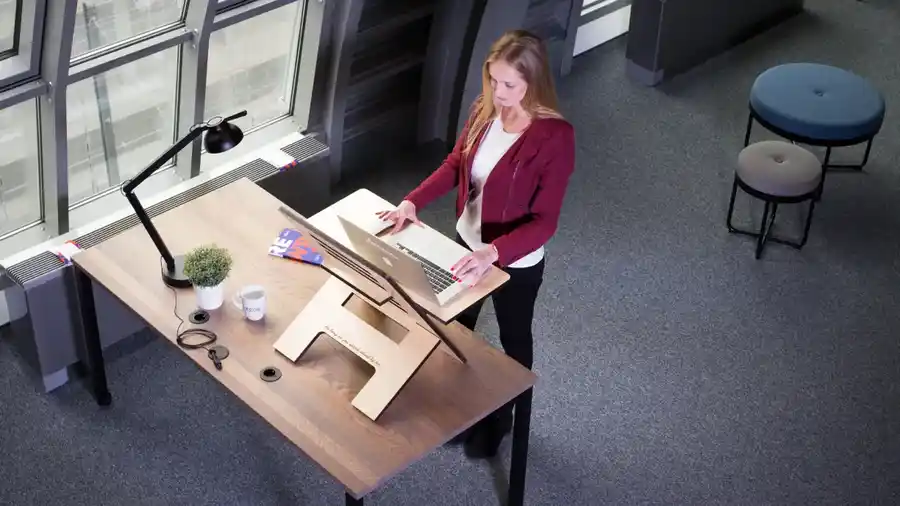
A desk converter should put your hands, eyes, and shoulders in a calmer position within minutes, not force you into a new strain pattern. The goal is neutral alignment: elbows near your ribcage, forearms roughly level, wrists straight, and your screen high enough that you are not craning your neck down.
Picture this: you sit at a desk for two hours, then raise the converter and keep typing without hunching or reaching. That only works if the converter changes the height of both the screen and the keyboard in a way your body can keep up with. A platform that only lifts the display while pushing the keyboard too far out turns one ache into two.
The best setups often follow a simple chain:
- The top of the screen sits near eye level.
- The keyboard sits where your elbows can stay bent around 90 degrees.
- The mouse sits at the same level and close enough that your shoulder does not drift forward.
- Your feet stay flat or supported, so your lower back does not take over.
A lot of people think “standing desk” is the point. It isn’t. The real point is to move between postures without creating a new fixed posture. If you stand still with locked knees and shoulders raised, you have only traded one bad habit for another. A desk converter should make switching easier, not turn standing into a performance.
How high should a desk converter be?
The right converter height is the one that lets your forearms stay level and your neck stay neutral, not the one that looks tallest. If the converter pushes the keyboard too high, your shoulders hike up. If it sits too low, you slump and bend your neck to see the screen.
Picture this: you raise the platform, sit back down, and notice your wrists are angled up and your shoulders feel tight within ten minutes. That is the wrong height. The fix is usually not “stand straighter”; it is adjusting the work surface, the chair, or both.
Use this order:
- Adjust the chair first if you plan to sit for part of the day.
- Set keyboard height so your elbows are close to 90 degrees.
- Place the screen so the top line of text is near eye level.
- Keep the mouse on the same plane as the keyboard.
The catch is that most desks and converters have fixed ranges. A converter with a 15-inch lift range may be fine for one user and far too tall for another once a chair is added. Taller users often need more rise; shorter users often need less, or they end up shrugging.
Here’s the practical check:
- If your shoulders rise, the keyboard is too high.
- If your wrists bend back, the input surface is too high or the keyboard tray is too shallow.
- If your chin drops, the screen is too low.
- If your back rounds, the screen may be too far away or too low.
One more point matters: keyboard height and screen height do not always need to match. Many converters raise the whole platform together, which is convenient but not ideal. A setup that lets the screen and keyboard move more independently usually gives better ergonomics.
What size and weight capacity do you actually need?

You need a converter that fits your keyboard, screen, mouse, and movement style without wobble or crowding. A platform that is too small can make your mouse hand hang off the edge, while one that is too shallow can push the screen too close to your face.
Picture this: the converter rises, but the keyboard crowding forces the mouse to the side and the monitor sits close enough to make your neck tense. That is not an ergonomic upgrade. It is a cramped desk on stilts.
Before choosing, check these figures on the product page:
- Platform width
- Platform depth
- Lift range
- Weight capacity
- Keyboard tray size, if there is one
A small single-screen setup often needs less width than a dual-screen or laptop-plus-monitor setup. But depth matters just as much as width. If the converter is shallow, the keyboard can end up too close to the front edge, which leaves no room for forearm support. If it is too deep, it may crowd your desk and make you reach forward to type.
Weight capacity is not a marketing number to skim past. A converter rated for a light laptop setup may wobble more under a heavier display or a fully loaded accessory layout. Wobble matters because micro-movements make you tense your hands and shoulders without noticing. The heavier the setup, the more stable the base needs to be.
A sane match looks like this:
- Laptop-only users: compact platforms often work.
- Single-monitor users: medium platforms are usually better.
- Dual-display or heavy gear users: choose a sturdier frame and check the rated capacity closely.
Skip a converter that looks large but has a weak base. Big surface, poor support. Not close.
Why keyboard and mouse placement matter more than the screen
Keyboard and mouse placement usually decide whether a desk converter feels comfortable after 20 minutes or 2 hours. The screen gets all the attention, but your hands do the repetitive work, and that is where bad geometry shows up first.
Picture this: the screen is at a nice height, but the keyboard sits too far forward and the mouse drifts off to one side. Your wrists bend, your shoulder rotates, and your neck starts to follow the hand. That chain is common. It is also avoidable.
The best hand position keeps three things simple:
- Elbows stay near the torso.
- Wrists stay straight, not cocked up.
- The mouse stays beside the keyboard, not far away.
If the converter raises the keyboard and screen together, the mouse may end up too high or too far from your body. That is a real trade-off with many all-in-one platforms. A separate keyboard tray can help, but only if it is deep enough for your forearms and stable enough not to bounce.
A few red flags:
- Your wrists rest on a sharp edge.
- Your forearms float in the air.
- Your mouse hand reaches outward.
- Your shoulders roll forward while typing.
If your converter has a narrow keyboard shelf, a full-size keyboard may be the wrong fit. A compact keyboard can free up room for the mouse, but only if you actually like a smaller layout. The best ergonomic setup is not the one with the most accessories. It is the one that lets your hands stay relaxed without forcing awkward reaches.
How to use a desk converter without making posture worse
You use a desk converter well by changing positions often, keeping your tools close, and treating standing as one option, not the default. The converter is only half the setup; the rest is how long you stay in one posture and what you do with your feet, shoulders, and eyes. If pain is persistent or severe, a qualified health professional should check the cause, and guidance from an ergonomics source such as the Mayo Clinic can help you review your workstation setup.
Picture this: you stand for an hour, lock your knees, lean on one hip, and feel fine at first. Then your lower back tightens and your feet start to ache. That is not a converter failure. That is a static posture problem.
A better rhythm looks like this:
- Start seated if your body is stiff.
- Raise the converter for a work block.
- Shift your stance and weight every so often.
- Sit again before fatigue makes your form sloppy.
The truth is, standing is not “better” in a simple way. Long standing can bring foot pain, calf tension, and low-back fatigue. Sitting too long can do its own damage. The right use pattern mixes both. Many people do best with short standing blocks and seated breaks, especially during focused work or long typing sessions.
A few use habits make a big difference:
- Wear supportive shoes if you stand on a hard floor.
- Keep one foot slightly forward now and then.
- Avoid locking your knees.
- Put the mouse close so your shoulder stays relaxed.
- Keep frequently used items within arm’s reach.
The converter should also be raised and lowered smoothly enough that you will actually use it. If the mechanism takes two hands, feels unstable, or is annoying to adjust, you will stop changing positions. Then the whole point is lost.
What features matter most, and which ones are just noise?
The right features are the ones that protect posture, support your gear, and make adjustment easy. Fancy extras can be useful, but they should not hide weak height control, poor stability, or a cramped work surface.
Picture this: a product page talks about cable hooks, color choices, and a polished finish, but says little about lift range or keyboard depth. That is noise. The ergonomics come from geometry and stability, not from decoration.
Features worth caring about:
- Lift range: enough to match your sitting and standing needs
- Stability: less wobble at typing height
- Surface depth: enough room for keyboard and mouse
- Adjustment ease: fast enough to use daily
- Weight rating: enough for your actual setup
Features that often matter less than they seem:
- Extra shelves you will never use
- Decorative trim
- Fancy finishes
- Marketing labels that do not explain the geometry
The most useful feature for many readers is a keyboard level that gives forearm support without forcing the display too high. That sounds simple, but it is where many converters fail. If a platform looks impressive and still leaves you with a hunched upper back, it has missed the point.
A good rule: if a feature does not change comfort, support, or adjustability, it is a nice extra, not a reason to buy.
When a desk converter is the wrong tool
A desk converter is the wrong tool when your desk is too shallow, your gear is too heavy, or your work depends on perfect stability. Some setups are better served by a full standing desk, a monitor arm, or a chair-first ergonomic fix.
Picture this: the converter takes up half your desk, the keyboard tray feels crowded, and the screen still sits awkwardly low because the base cannot rise enough. At that point, you are forcing the tool to do a job it was never built for.
Reconsider the converter if:
- Your desk depth is already tight.
- You use heavy dual displays.
- You need a very stable writing or drawing surface.
- You want a true sit-stand workflow for many hours a day.
- Your chair and desk height are already close to ideal.
A full standing desk often wins when you need a larger, cleaner work area and smoother adjustment. A monitor arm can solve screen height without raising the whole keyboard setup. A better chair can fix lower-body support if the current chair is the real problem.
The flip side is that a desk converter is often the faster, cheaper, and less disruptive choice when you are stuck with a fixed desk. It can be a smart middle step. Just don’t expect it to solve a bad workspace by itself.
The honest side-by-side: what changes your choice
A desk converter wins for fast ergonomic improvement on an existing desk. A full standing desk wins when you need more room, more stability, or more adjustment freedom. The right choice depends on how much your current setup is holding you back.
Picture this: you are deciding between a compact converter and replacing the desk entirely. The answer is not about status. It is about geometry, load, and how much change your room can handle.
| Criteria | Desk Converter | Full Standing Desk | Winner for [condition] |
|---|---|---|---|
| Setup speed | Usually faster to add to an existing desk | Requires replacing the desk setup | Desk converter for a quick fix |
| Workspace size | Can feel cramped on shallow desks | Usually offers more open surface area | Standing desk for larger gear |
| Stability | Can wobble more, especially at height | Often steadier if the frame is solid | Standing desk for heavy typing or multiple screens |
| Cost of change | Lower disruption to an existing room | Higher shift in furniture and layout | Desk converter for renters or temporary setups |
| Ergonomic control | Less control over separate screen and hand height | More flexibility, depending on the model | Standing desk for fine-tuned positioning |
| Portability | More manageable to move or remove | Usually stays put | Desk converter for shared spaces |
| Cable management | Can get cluttered quickly on a raised platform | Often easier to route cleanly | Standing desk for cable-heavy setups |
| Best use case | Improving one fixed desk without a full remodel | Building a long-term sit-stand workstation | Desk converter for fast ergonomic upgrade |
A converter is the better first move if you need relief soon and your gear is not extreme. A standing desk is the better long-term answer if the whole workspace needs a reset. That is the clean split.
The exceptions that flip the verdict
A desk converter is not always the better choice, even for someone who wants sit-stand flexibility. The verdict flips when the room, the gear, or the job creates a problem the converter cannot solve cleanly.
Picture this: you like the idea of a converter, but your desk is already packed, your keyboard use is heavy, and your screen setup is awkward. At that point, forcing the converter to work is the expensive mistake.
Here are the cases that change the answer:
- Your desk is very shallow — a converter can eat the space you need for forearm support, so a standing desk or monitor arm may be the better fix.
- Your setup is heavy — dual displays, large mounts, or dense accessories make wobble more likely, and a sturdier desk frame becomes more sensible.
- You need high-frequency adjustment — if you raise and lower the surface many times a day, an easy-lift standing desk usually beats a converter.
- Your lower-body setup is the real issue — if your chair, foot support, or floor height is wrong, a converter will not solve the main problem.
Look at the desk depth, the gear weight, and the amount of adjustment you actually need in a normal day. Those three facts usually reveal the answer faster than any product ad.
How to set one up correctly the first day
A desk converter works best when you set it up with your chair, screen, and input devices in the right order. If you skip that order, you can end up chasing comfort one adjustment at a time for days.
Picture this: you place the converter on the desk, plug everything in, and start working immediately. Two hours later, your neck hurts and the mouse feels far away. That is what happens when setup is rushed.
Use this order instead:
- Set your chair height first.
- Raise the converter so the keyboard lands near elbow height.
- Put the screen high enough that you are not looking down.
- Move the mouse close to the keyboard.
- Check foot placement.
- Adjust again after 10 to 15 minutes of real work.
A useful check is your view line. If you are tilting your head down to read the screen, the display is still too low. If your shoulders are lifted, the keyboard is too high. If your wrist bends back while typing, the shelf or keyboard angle is wrong.
Cable management matters more than people expect. A raised platform can tug on cables and limit how far the converter can move. If the cords are stretched tight, the setup will feel awkward every time you adjust it. Leave enough slack so raising and lowering the unit does not pull the screen or keyboard off position.
The verdict: which setup is right for you?
Choose a desk converter if you need a faster ergonomic fix for an existing desk, your gear is moderate, and you want a sit-stand option without replacing the whole workstation. Choose a full standing desk if you need more surface area, more stability, or frequent height changes through the day. Neither if your real problem is a shallow desk, heavy dual-screen gear, or a chair setup that is already fighting you.
That answer is blunt on purpose. A converter is a smart tool for many people, but it is not the final answer for every desk. If the geometry is wrong, the best-looking platform in the world will still feel wrong.
Is a desk converter actually better than a standing desk?
A desk converter is better only when you need a change that is fast, compact, and reversible. A standing desk is better when you want a larger, more stable workstation with more room to fine-tune the height.
The choice is not about which one sounds healthier. It is about what your room and your work ask for. If you are trying to improve one fixed desk, a converter often makes sense. If you are building a long-term workstation, a standing desk usually gives you more control.
What is the biggest mistake people make with desk converters?
The biggest mistake is setting the screen first and forgetting the keyboard, mouse, and chair. That creates shoulder lift, wrist bend, or a cramped reach even when the display height looks right.
A converter should be judged as a full body setup, not a display riser. If your elbows are high, your wrists are bent, or your mouse sits too far away, the setup is off. A few centimeters can change the whole feel.
Can a desk converter help with neck pain?
A desk converter can help with neck strain if the screen is too low and your posture improves after the change. It will not help if the keyboard height, mouse reach, or chair position still force you to hunch.
The key is alignment, not height alone. If the top of the screen is still below eye level or you keep dropping your chin, the neck problem may stay. If pain is persistent or severe, a qualified health professional should check the cause.
Do I need a converter with a separate keyboard tray?
A separate keyboard tray can help if the screen needs to sit higher than your hands do. It gives more control over the split between display height and typing height.
It is not always necessary, though. Some people do fine with a single-lift platform if the geometry matches their chair and desk. If the tray is narrow, shaky, or too shallow, it can create more trouble than it solves.
How long should I stand at a desk converter?
There is no single correct time block, and a fixed number would be dishonest. The better rule is to switch before your form breaks down.
If your feet ache, your knees lock, your shoulders rise, or your lower back tightens, it is time to sit. A good converter supports movement through the day. It does not ask you to stay upright until you feel beat up.
Should I buy a desk converter if I work from home all day?
A desk converter can be a strong choice for a home office if your desk is fixed and your work gear is moderate. It is less suitable if you type for long stretches, use heavy displays, or need a larger work surface.
The best test is simple: if your setup needs only a better height range and a bit more movement, a converter makes sense. If the whole desk feels wrong, start looking at a full desk replacement instead.
Drafted with AI; not yet reviewed by a person.

One thought on “Desk Converter Ergonomics and Use: The Complete Guide”