Do You Need a Keyboard Tray With a Standing Desk Converter?
You need a keyboard tray if you type more than about two hours a day and your desk has the depth to fit one — otherwise, typing directly on the converter’s main platform is usually fine. Trays also carry a lower weight limit than the main platform: Eureka Ergonomic publishes a 5 lb tray limit on its 36″ converter, well under the 30-80 lb ratings common for the main surface.
- Typing hours per day is the first filter: under 2 hours, a tray is optional; 4+ hours, a tray is worth the extra depth.
- A tray adds real depth in front of the converter’s base — published tray depths range from about 7.5″ to almost 17″ depending on the model.
- Keyboard trays are rated for less weight than the main platform. Eureka Ergonomic’s 5 lb tray limit is the only manufacturer-published tray-specific figure found in this review.
- FlexiSpot and Mount-It list tray dimensions but not a separate tray weight limit on their own spec pages — don’t assume it matches the platform rating.
- If your desk is already tight on depth, skip the tray rather than cramming the converter’s full footprint plus a tray onto a desk that can’t fit both.
How Many Hours a Day Do You Actually Type?
This is the simplest filter, and the one most generic ergonomic articles skip in favor of general wrist-angle advice. The more hours you spend typing, the more a lower, tray-mounted keyboard position matters for a neutral wrist angle.
| Typing hours per day | Tray recommendation |
|---|---|
| Under 2 hours | Optional — typing on the main platform is usually fine for occasional use |
| 2-4 hours | Worth adding if your desk depth allows it (see next section) |
| 4+ hours | Recommended for a lower, more neutral wrist angle during sustained typing |
Does Your Desk Have the Depth for a Tray?
A keyboard tray doesn’t float in space — it adds its own depth in front of the converter’s base, and that combined footprint has to fit your desk. Published tray depths vary more than most buying guides mention.
| Converter | Keyboard tray size | Platform depth |
|---|---|---|
| Mount-It MI-7962 | 35.5″ W x 7.5″ D | 48.5″ W x 23.25″ D overall |
| Mount-It MI-7927E | 35.4″ W x 11″ D | 35.4″ W x 23.22″ D overall |
| FlexiSpot AlcoveRiser M7 | 28.3″ W x 12.2″ D | 28.3″ W x 16.3″ D work surface |
| Eureka Ergonomic 36″ | 36″ W x 16.875″ D | 36″ W, 22″ D overall |
Measure your desk’s depth, then compare it to the converter’s base depth plus however far the tray extends toward you when pulled out. If the two don’t fit together, either choose a converter with a shallower tray or skip the tray and type on the main platform instead.

What Weight Limit Does a Keyboard Tray Actually Carry?
This is the number most ergonomic buying guides leave out entirely, and it matters because trays are consistently rated for less weight than the main display platform.
Eureka Ergonomic publishes a 5 lb limit on its 36″ converter’s keyboard tray, separate from the 30 lb display-surface rating. FlexiSpot’s AlcoveRiser M7 and Mount-It’s MI-7962 and MI-7927E all list tray dimensions on their own spec pages, but none of them publishes a separate tray weight limit — treat that as unconfirmed rather than assuming it matches the platform’s combined rating. A keyboard and mouse together are usually light enough to fit comfortably under a 5 lb limit, but if you plan to rest a tablet, a second keyboard, or anything heavier on the tray, check the maker’s own number first.

Does Adding a Tray Change What You Pay?
Tray presence is one factor among several that affects a converter’s price, not the whole story — mechanism type (electric versus gas-spring), platform size, and brand all move the number too. For context, the Academy of Occupational Health and Risk Sciences (AOHRS), a workplace-safety resource site, estimates sit-stand converters generally run about $150-$500, with an estimated 10-year cost of ownership around $700-$750 assuming one replacement within the decade. That’s a general converter-category estimate from a secondary source, not a tray-specific price difference, so treat it as background context rather than a number to budget a tray purchase against directly.
Putting It Together: A Decision Flow
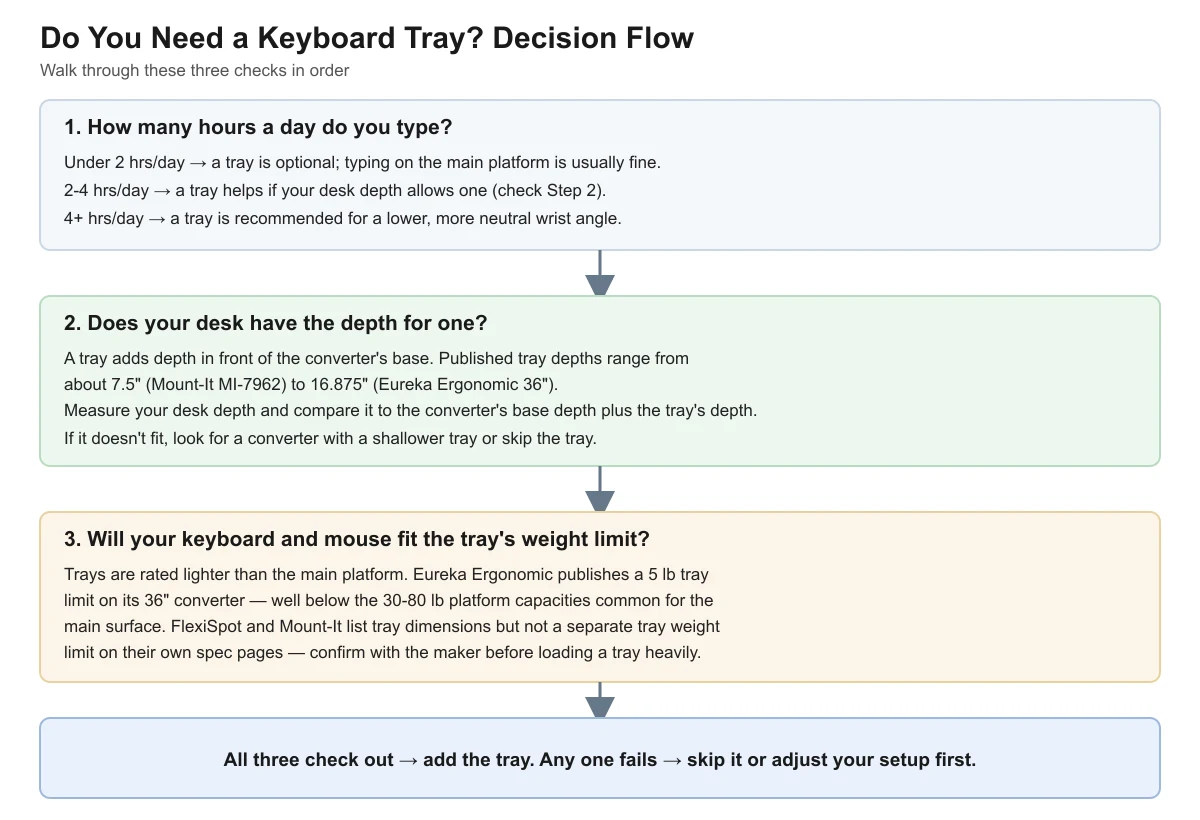
Run through typing hours, desk depth, and tray weight limit in that order. All three need to check out before a tray makes sense for your setup.
| Check | What to look at |
|---|---|
| 1. Typing hours per day | Under 2 hrs: optional. 2-4 hrs: helpful if depth allows. 4+ hrs: recommended. |
| 2. Desk depth | Compare desk depth to the converter’s base depth plus the tray’s own depth (7.5″-16.875″ across the models reviewed). |
| 3. Tray weight limit | Keep keyboard + mouse at or under the tray’s rated limit (5 lb on Eureka Ergonomic’s 36″; unconfirmed on FlexiSpot/Mount-It). |
| Result | All three check out → add the tray. Any one fails → skip it or adjust your setup first. |
Frequently Asked Questions
Do all standing desk converters come with a keyboard tray?
No. Some converters, especially simple riser-platform models, are a single flat surface with no separate tray. Others, like the four models reviewed here, include a tray as a built-in second tier below the main display surface. Check the product listing before assuming one is included.
Can I add a keyboard tray later if I decide I need one?
That depends on the converter. Built-in trays, like the ones on the Eureka Ergonomic, FlexiSpot, and Mount-It models above, are part of the frame and can’t be added after purchase. If you’re unsure whether you’ll want one, buying a model with a tray already included is safer than hoping to retrofit one.
Is a keyboard tray worse for my wrists than typing on the main platform?
Not inherently — a tray is often used specifically to lower the keyboard to a more neutral wrist angle relative to a raised display surface. The main risk is a tray that’s too shallow or too narrow for comfortable arm position, which is why checking the tray’s own dimensions matters as much as the overall platform size.
What happens if I put more than the rated weight on a keyboard tray?
Manufacturers don’t publish failure data, so there’s no official number for what happens past the rated limit. As a general rule, going past the listed capacity on any load-rated furniture component risks the tray sagging, the slide mechanism binding, or the release latch wearing out faster — it’s not a line to test deliberately.
Does the converter type (riser, monitor-arm style, or full-surface) change whether I need a tray?
Yes, indirectly. Full-surface converters with a built-in second tier, like the four models compared here, are designed with a tray in mind. Simpler riser-platform converters and monitor-arm styles more often skip a dedicated tray entirely, so the decision becomes less “add a tray or not” and more “does this converter type include one at all.” Check the product listing’s included parts before assuming a tray comes with any given converter.
Sources
- AOHRS — Standing Desks vs. Sit-Stand Converters (cost and lifespan estimates)
- Eureka Ergonomic 36″ converter spec page (authorized dealer)
- FlexiSpot AlcoveRiser M7 spec page
- Mount-It MI-7962 spec page
- Mount-It MI-7927E spec page
Related reading on this site: How to Choose a Standing Desk Converter: Buying Guide, Standing Desk Converter Types: Riser, Monitor-Arm or Full-Surface, and Standing Desk Converter Depth for a Small Desk.
deskconverterguide.com Editorial Team. Last updated: November 13, 2026.