How to Stop a Standing Desk Converter From Wobbling
A wobbling standing desk converter is usually caused by a base that’s too shallow for the desk, loose assembly bolts, or an uneven desk surface. Tighten all hardware in the order the manual specifies, add non-slip pads under the base, and test for wobble at full standing height, not just while seated.
By deskconverterguide.com Editorial Team · Last updated: November 13, 2026
Key takeaways
- Check the base-depth-to-desk-depth ratio first. A converter base notably shallower than the desk (below roughly 70% of desk depth — this site’s own rule of thumb, not a published standard) is a common root cause of front-to-back rock.
- Loose bolts and fasteners are the single most fixable cause of wobble. Retighten them in the order the manufacturer’s manual specifies.
- Non-slip pads under all base contact points reduce side-to-side slide, though they don’t fix a true depth mismatch.
- Always test for wobble at full standing height. A converter can feel solid seated and still rock once raised.
- An uneven or flexible desk surface can cause wobble that has nothing to do with the converter itself.
Why do standing desk converters wobble?
Wobble usually comes from one of five things: a base depth that’s shallow relative to the desk, loose fasteners from shipping or regular use, an uneven or flexible desk surface, a loose clamp or mounting connection, or a converter loaded past its rated weight capacity. The fix depends on which one applies, so work through the checklist below in order rather than guessing.
What is the base-depth-to-desk-depth ratio, and how does it cause wobble?
No standards body publishes an exact base-depth-to-desk-depth ratio for standing desk converters. The general engineering principle is that a base needs to stay under the center of gravity of whatever sits on top of it — the narrower a converter’s base is relative to the desk underneath it, the easier it is to rock front-to-back, especially at full standing height where the weight sits higher and farther from the base.
As a practical guideline, this site recommends a converter base depth at or above roughly 70% of your desk’s own depth. This is our own derived rule of thumb, not a certified number from ANSI/BIFMA or any manufacturer. See our full depth-matching guide for the measuring worksheet and a table of manufacturer base depths.
Pre-purchase checklist to avoid wobble before you buy
- Measure your desk’s depth and compare it to the converter’s base-depth spec using the 70% guideline above.
- Check the converter’s rated weight capacity against your actual equipment — monitors, keyboard, and anything else that will sit on the platform.
- Decide on mounting type (clamp-on vs. freestanding) based on your desk’s compatibility; see our mounting guide for the compatibility checklist.
- If possible, read the manual’s assembly and bolt-tightening instructions before you buy, so you know what installation involves.
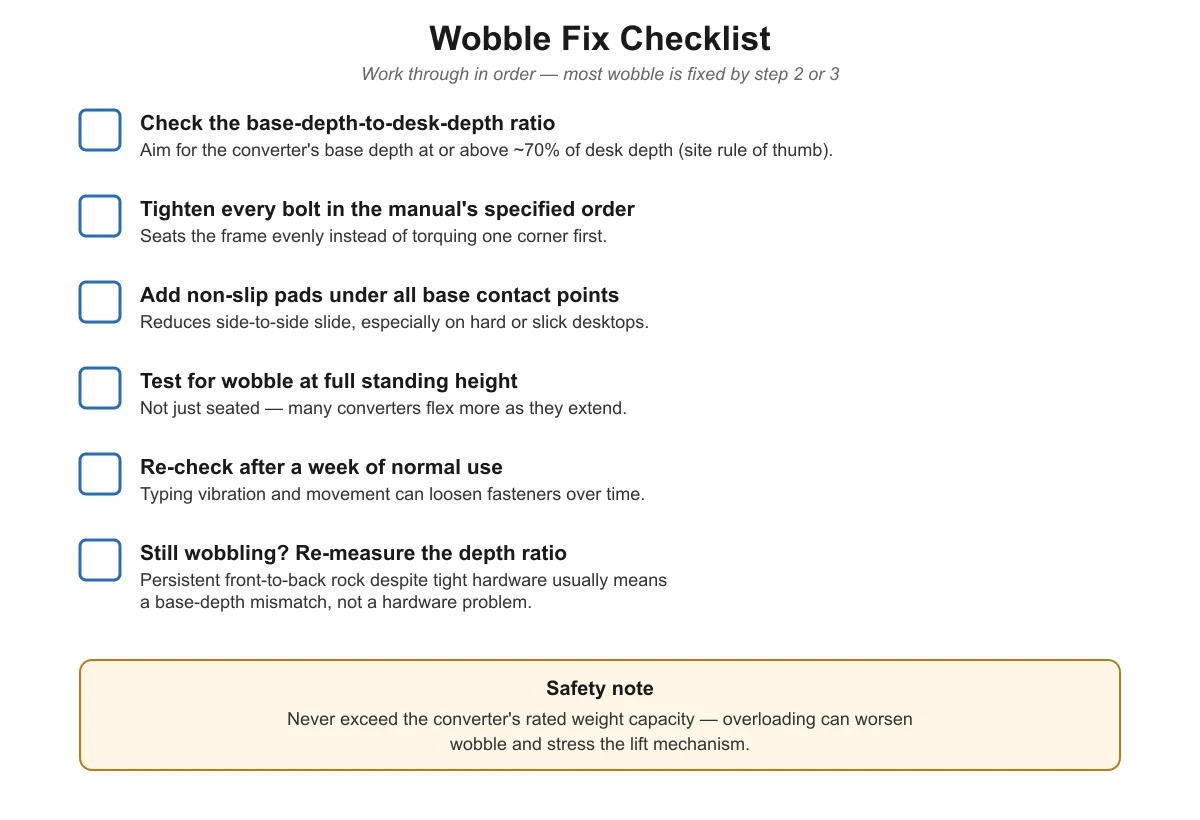
Post-assembly checklist to fix wobble
If you already own a converter that’s wobbling, work through these steps in order:
- Tighten every bolt in the order the manual specifies. This seats the frame evenly instead of torquing one corner first, which can itself introduce a twist.
- Add non-slip pads under all base contact points, especially on hard or slick desk surfaces. This reduces side-to-side slide, though it won’t fix a true depth mismatch.
- Check for wobble specifically at full standing height, not just the seated or lowered position. Many converters flex more as they extend upward.
- Re-check after about a week of normal use. Vibration from typing and daily movement can loosen fasteners that felt tight at installation.
- If wobble remains after tightening and pads, re-measure your desk’s depth against the converter’s base-depth spec. A persistent front-to-back rock despite tight hardware usually points to a base-depth-ratio mismatch rather than a hardware problem.
What causes wobble, and how do I fix each one?
| Possible cause | How to check | Fix |
|---|---|---|
| Base too shallow for the desk (ratio mismatch) | Measure desk depth, compare to the converter’s base-depth spec | Choose a deeper-based model, or confirm the 70% guideline is met |
| Loose bolts or fasteners | Wobble noticeably reduces when hand-tightening each bolt | Retighten in the manufacturer’s specified order |
| Uneven desk surface | Check for visible gaps under the base with a straightedge | Reposition on a flatter section of the desk, or shim the gap |
| Slick or hard surface causing slide | Base shifts sideways under light hand pressure | Add non-slip pads under all base contact points |
| Loose clamp or mount connection | Wobble concentrated at the desk edge, not the base | Retighten the clamp mechanism; recheck desk edge compatibility |
| Overloaded weight capacity | Compare your actual equipment weight to the rated capacity | Remove excess weight, or choose a higher-capacity model |
Is a little bit of wobble normal?
Some flex is different from a true stability problem. Try a simple push test: at full standing height, press down firmly on the front corner of the platform and release. A small amount of give that stops immediately, especially on a gas-spring model where the platform rides on a spring-assisted arm, is usually just the mechanism’s normal flex under load. Repeated front-to-back rocking that continues after you let go, or a platform that visibly tips toward one edge, points to one of the causes in the table above and is worth fixing rather than living with.
Electric converters with a rigid lift column tend to feel stiffer under the same push test than gas-spring models, simply because of how the two mechanisms are built. That difference in feel is normal and isn’t on its own a sign that either type is unsafe, as long as the unit is within its rated weight capacity and passes the full-height wobble check described above.
Does the mounting style matter for wobble?
Yes. Freestanding converters depend on their own base footprint for stability, which is why the depth-ratio guideline above matters most for them. Clamp-mounted converters instead depend on the desk-edge connection and clamp tightness; see our clamp-on vs. desktop mounting guide for the compatibility checks specific to that mounting style. For the full buying picture beyond wobble — weight capacity, mechanism type, and sizing — start with our standing desk converter buying guide.
Frequently asked questions
Why does my standing desk converter wobble more at full height than seated height?
Raising the platform extends the lift mechanism and moves the center of weight farther from the base, so any looseness in the bolts or a base that’s slightly shallow for the desk becomes more noticeable. Always test wobble at the height you actually work at, not just the lowered position.
Will tightening bolts always fix a wobbly converter?
Not always. Tightening fixes wobble caused by loose hardware, which is common after shipping or months of use. But if the converter’s base depth is well under your desk’s depth, tightening bolts won’t stop a true front-to-back rock caused by the mismatch.
Do non-slip pads fix wobble?
Non-slip pads mainly stop side-to-side sliding on hard or slick desk surfaces. They help but don’t substitute for checking the base-depth-to-desk-depth ratio or tightening loose fasteners, which are the two most common root causes of true front-to-back wobble.
Can an overloaded converter wobble?
Yes. Loading a converter beyond its rated weight capacity — for example, more than the 30 lbs rated on the Uncaged Ergonomics CHANGEdesk or 80 lbs on the VersaDesk PowerPro — can stress the lift mechanism and contribute to instability, in addition to being a manufacturer warranty and safety concern.
Sources
- Eureka Ergonomic: BIFMA office furniture safety tests
- Woodworking Advisor: general furniture base-to-top stability principles
- VersaDesk PowerPro product specifications
- Uncaged Ergonomics CHANGEdesk product specifications
- Mount-It MI-7962 product specifications
- FlexiSpot AlcoveRiser M7 product specifications