Standing Desk Converter Weight Capacity for Dual Monitors
Add up the actual weight of your monitors with their stands, then compare that total to the converter’s rated capacity — not a generic “30-50 lb” range. Two typical 24-27 inch monitors usually weigh 17-25 lbs combined with their stands, which fits comfortably within most converters’ 30-80 lb ratings, but you should always check your specific model’s published number before buying.
- Weigh your own monitors (with stand) instead of trusting a generic range — the gap between models is large.
- Published converter capacities range from 30 lbs (Uncaged Ergonomics CHANGEdesk) to 80 lbs (VersaDesk PowerPro).
- Only Eureka Ergonomic, among the brands reviewed here, publishes a split limit: 30 lbs for the display surface and 5 lbs for the keyboard tray — most brands give one combined number instead.
- A monitor arm’s own weight counts against the converter’s load if the arm clamps to the converter’s platform rather than the desk itself.
- A 20% safety margin below the rated capacity is a sensible personal rule of thumb, not a number any manufacturer in this review publishes.
What Weight Capacity Do Standing Desk Converters Actually Have?
Manufacturer-published capacities vary more than most “best of” roundups suggest. Some brands rate the platform and keyboard tray as one combined number; only one brand in this review splits them out separately.
| Converter | Platform size | Weight capacity | Mechanism |
|---|---|---|---|
| Uncaged Ergonomics CHANGEdesk | 18″ W x 25.25″ D | 30 lbs | Gas-spring, fixed positions |
| Eureka Ergonomic 36″ | 36″ W, 22″ D overall | 35 lbs combined — 30 lbs display surface + 5 lbs keyboard tray (the only split figure found) | Gas cylinder, dual hand-release |
| FlexiSpot AlcoveRiser M7 | 28.3″ W x 16.3″ D | 37.4 lbs combined | Gas spring |
| VersaDesk PowerRiser | Compact | 44 lbs | Electric |
| Mount-It MI-7927E | 35.4″ W x 23.22″ D | 44 lbs combined (platform + tray, not split) | Electric |
| Mount-It MI-7962 | 48.5″ W x 23.25″ D | 44 lbs combined | Electric |
| VersaDesk PowerPro | 36″ W x 24″ D (also 40″ and 48″ widths) | 80 lbs | Electric |
Notice that FlexiSpot and Mount-It list keyboard-tray dimensions but do not publish a separate tray weight limit on their own spec pages. Don’t assume a tray can carry the same load as the main platform just because the brand doesn’t say otherwise — treat an unlisted tray limit as “no data” and keep tray loads light until you confirm with the maker.

How Much Do Your Monitors Actually Weigh?
This is the number most buying guides skip. Manufacturer spec pages list it clearly for most models — here are three real examples that show how much the number can swing by size and model.
| Monitor | Weight with stand |
|---|---|
| Dell 24″ monitor (E2423H) | 8.5 lbs |
| Dell 27″ monitor (S2725HSM) | 12.63 lbs |
| Samsung 32″ business monitor (LS32D85KTS, WQHD) | 26.9 lbs |
The Samsung figure is the heavy end of the 32-inch range — it’s a specific business-grade WQHD model. Many 32-inch consumer monitors in the same product family, including curved and FHD panels, weigh closer to 11-14 lbs with their stands. Always check your own model’s page; “32-inch” alone doesn’t tell you the weight.
How Do You Calculate Your Setup’s Total Load?
Add the display-surface items first, compare that total to the converter’s rated display capacity, then check the keyboard tray separately against its own, usually lower, limit. Here’s a worked example using a Dell 27″ and a Dell 24″ monitor on a converter with a published split capacity.
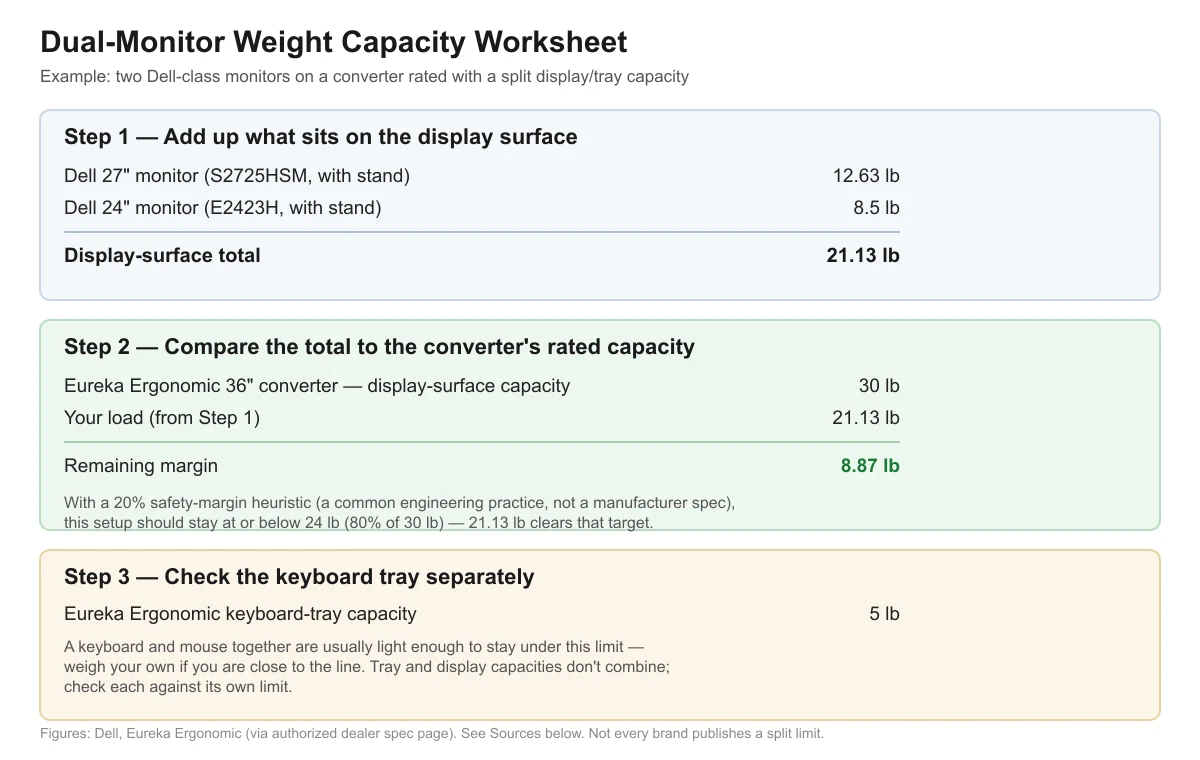
In this example, the Dell 27″ (12.63 lbs) plus the Dell 24″ (8.5 lbs) add up to 21.13 lbs on the display surface. Against the Eureka Ergonomic 36″ converter’s published 30 lb display capacity, that leaves 8.87 lbs of margin. Applying a 20% safety-margin heuristic — a common engineering practice, not a figure any manufacturer in this review publishes — the practical target becomes 24 lbs (80% of 30), and 21.13 lbs still clears it comfortably. The keyboard tray is checked separately against its own 5 lb limit; a keyboard and mouse together are usually light enough to stay under that on their own.
| Line item | Value |
|---|---|
| Dell 27″ monitor (S2725HSM, with stand) | 12.63 lb |
| Dell 24″ monitor (E2423H, with stand) | 8.5 lb |
| Display-surface total | 21.13 lb |
| Eureka Ergonomic 36″ display-surface capacity | 30 lb |
| Remaining margin | 8.87 lb |
| 20% safety-margin target (writer’s own heuristic, 80% of 30 lb) | 24 lb |
| Keyboard-tray capacity (checked separately) | 5 lb |
What About Monitor Arms Instead of Stands?
A monitor arm changes the math in one important way: if the arm clamps to the converter’s own platform (rather than to the desk edge behind the converter), the arm’s weight is added to the converter’s load along with the monitor’s weight — not just the monitor alone.
The Ergotron LX Desk Mount LCD Arm is rated for 7-20 lbs per arm and is built for monitors 24 inches or smaller with 100x100mm or 75x75mm VESA mounts. Ergotron also sells LX variants rated for slightly larger displays and an HX line rated 20-42 lbs for monitors up to 49 inches, but those larger-capacity figures were not independently confirmed on a live manufacturer page for this article — re-verify the exact model’s rating before relying on it for a larger monitor.
| Scenario | What counts toward the converter’s load |
|---|---|
| Monitor resting on its own stand on the platform | Monitor + stand weight only |
| Monitor on an arm clamped to the converter’s platform | Monitor weight + the arm’s own weight |
| Monitor on an arm clamped to the desk behind the converter | Nothing — the arm’s clamp bypasses the converter’s platform entirely |
What’s a Safe Safety Margin?
No manufacturer reviewed here publishes a recommended safety margin for converter weight capacity. Treating 80% of the rated capacity as your practical ceiling — the same general engineering habit used for shelving, ladders, and other load-rated equipment — is a reasonable personal practice, not a number backed by a cited standard. If your setup lands close to the full rated capacity rather than comfortably under it, that’s a sign to pick a higher-capacity converter rather than test the limit.
Frequently Asked Questions
Can I use a 30-37 lb converter for two 27-inch monitors?
Two Dell-class 27″ monitors with stands add up to about 25 lbs, which fits under a 30-37 lb combined rating with some margin. Heavier 27-32″ models can push closer to the limit, so check your exact monitor’s spec page before assuming it fits.
Does a monitor arm count against the converter’s weight limit?
Only if the arm clamps to the converter’s own platform. In that case, add the arm’s weight to the monitor’s weight. If the arm clamps to the desk surface behind the converter instead, it doesn’t load the converter at all.
What if my converter doesn’t list a separate tray weight limit?
Treat it as unknown rather than assuming it matches the main platform’s rating. FlexiSpot and Mount-It, for example, publish tray dimensions but not a tray-specific weight limit on their own pages — keep tray loads light and check with the maker if you’re unsure.
Is a 30 lb converter enough for one large monitor plus a laptop?
It depends on the exact monitor and laptop. A single large monitor can weigh anywhere from about 9 to 27 lbs with its stand depending on size and model, and a laptop typically adds a few more pounds — add your specific items’ published weights rather than guessing.
Why do some converters list one combined weight number instead of splitting platform and tray?
Most of the brands reviewed here engineer the platform and tray as one structural unit and rate the whole assembly together. Eureka Ergonomic’s 36″ model is the only one in this review that publishes a separate tray limit, which makes it useful as a reference point — but it doesn’t mean other brands’ trays are rated the same way.
Sources
- VersaDesk PowerPro spec page
- FlexiSpot AlcoveRiser M7 spec page
- Mount-It MI-7962 spec page
- Mount-It MI-7927E spec page
- Uncaged Ergonomics CHANGEdesk spec page
- Eureka Ergonomic 36″ converter spec page (authorized dealer)
- Dell 27″ monitor S2725HSM spec page
- Dell 24″ monitor E2423H spec page
- Samsung 32″ business monitor LS32D85KTS spec page
- Ergotron LX Desk Mount LCD Arm spec page
Related reading on this site: How to Choose a Standing Desk Converter: Buying Guide, Standing Desk Converter Types: Riser, Monitor-Arm or Full-Surface, and Standing Desk Converter Width for a Dual-Monitor Setup.
deskconverterguide.com Editorial Team. Last updated: November 13, 2026.