
Standing Desk Converter Width for a Dual-Monitor Setup
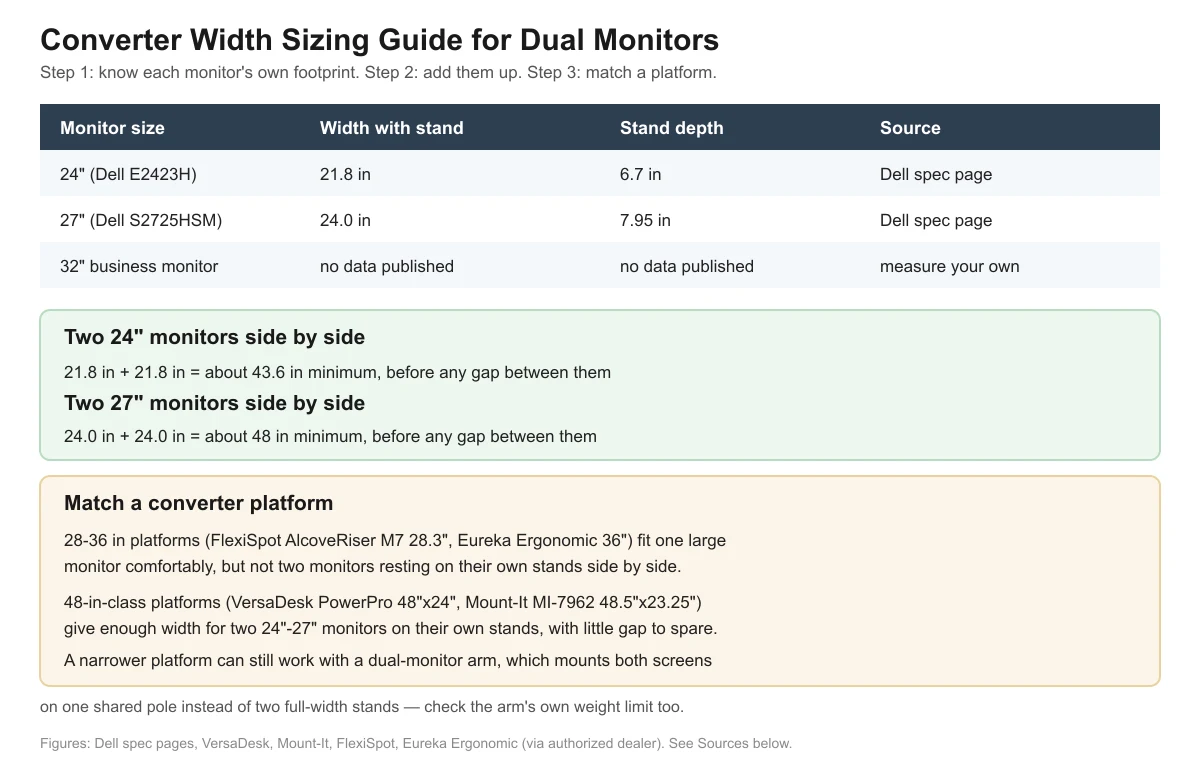
Measure each monitor’s own width with its stand, add the two together, then match that number to a converter platform at least that wide. Two 24-inch monitors need roughly 44 inches of platform width side by side, and two 27-inch monitors need roughly 48 inches — which rules out most 28-36 inch converters unless you use a dual-monitor arm instead of each monitor’s own stand.
- Measure your own monitors’ width with their stands — “24-inch” and “27-inch” refer to the diagonal screen size, not the footprint on your desk.
- Two 24″ monitors side by side need about 44 inches of platform width; two 27″ monitors need about 48 inches, before adding any gap between them.
- Most 28-36 inch converter platforms fit one large monitor comfortably but not two monitors resting on their own stands side by side.
- 48-inch-class platforms exist from at least two brands reviewed here and are sized for two monitors on their own stands.
- A dual-monitor arm mounts both screens on one shared pole, which needs far less desk width than two full stands — but check the arm’s own weight rating too.
How Wide Is Your Monitor, Actually?
The diagonal size printed on the box isn’t the number you need. What matters for desk width is the monitor’s physical width with its stand attached, which manufacturer spec pages list separately.
| Monitor | Width with stand | Stand depth |
|---|---|---|
| 24″ (Dell E2423H) | 21.8 in | 6.7 in |
| 27″ (Dell S2725HSM) | 24.0 in | 7.95 in |
| 32″ business monitor | no data published on the manufacturer’s page checked for this article | no data published |
For a 32-inch model, check your own monitor’s spec sheet or manual rather than assuming a width — the gap between a compact 32″ business panel and a wide curved 32″ display can be several inches.
How Do You Add Up the Width for Two Monitors?
Once you know each monitor’s own width, the method is simple addition, with one catch: manufacturers don’t publish a standard gap to leave between two monitors, so budget a few extra inches yourself for cable clearance and so the stands aren’t touching.

| Pairing | Combined width (stands touching) |
|---|---|
| Two 24″ monitors | About 43.6 in (21.8 in + 21.8 in) |
| Two 27″ monitors | About 48.0 in (24.0 in + 24.0 in) |
| One 24″ + one 27″ monitor | About 45.8 in (21.8 in + 24.0 in) |
Which Converter Platforms Are Actually Wide Enough?
This is where most “best of” roundups stop at a vague “36 inches is usually enough” rule. The real answer depends on whether your monitors sit on their own stands or share an arm.
| Converter | Platform width | Fits two monitors on their own stands? |
|---|---|---|
| FlexiSpot AlcoveRiser M7 | 28.3 in | No — fits one large monitor or a laptop comfortably |
| Eureka Ergonomic 36″ | 36 in | Tight to no — shy of the ~44 in needed for two 24″ monitors |
| Mount-It MI-7927E | 35.4 in | Tight to no — same shortfall as above |
| VersaDesk PowerPro (36″/40″/48″ options) | Up to 48 in | Yes, in the 48″ width — fits two 24-27″ monitors with little gap to spare |
| Mount-It MI-7962 | 48.5 in | Yes — fits two 24-27″ monitors with a little more breathing room |
If your heart is set on a narrower 28-36 inch platform, the practical fix isn’t a wider converter — it’s a dual-monitor arm that clamps both displays onto one shared pole. That setup needs only as much platform width as the arm’s base clamp, not the combined width of two monitor stands. Just remember the arm’s own weight then counts against the converter’s load if the arm clamps to the converter’s platform rather than the desk itself.

A Step-by-Step Measuring Method
Use this sequence before you buy, rather than relying on a single “36 inches is standard” rule of thumb:
- Measure each monitor’s physical width with its stand attached — use a tape measure, not the diagonal screen size printed on the box.
- Add the widths of all the monitors you plan to place on the converter’s platform.
- Add a few extra inches of your own choosing for clearance between stands and cable routing — no manufacturer publishes a required gap, so this is a personal comfort margin.
- Compare that total to the converter’s published platform width on its own spec page, not a third-party listicle’s rounded-off number.
- Check the platform’s depth against your desk’s depth too — width and depth are separate checks, and a converter can pass one while failing the other.
What About Desk Depth, Not Just Width?
Width and depth are two separate measurements that both have to work. A converter wide enough for two monitors can still be too deep for a small desk, or too shallow to hold a keyboard tray if you want one. Platform depths among the models referenced in this article range from about 16.3 inches (FlexiSpot AlcoveRiser M7) to 24 inches (VersaDesk PowerPro), so check both numbers rather than assuming a wide platform is automatically shallow enough for your desk.
Frequently Asked Questions
Do I need a 48-inch converter for any dual-monitor setup?
Only if both monitors will sit on their own stands side by side. If you use a dual-monitor arm instead, a narrower 28-36 inch platform can work, since the arm needs only its base clamp’s footprint, not the full width of two monitor stands.
How much gap should I leave between two monitor stands?
No manufacturer reviewed here publishes a standard gap figure. A few inches of clearance is a reasonable practical allowance for cables and so the stands aren’t touching, but there’s no official number — measure your own monitors’ stand width and decide based on how tightly you’re comfortable placing them.
Does a wider converter also need a higher weight capacity?
Not necessarily — width and weight capacity are separate specs that don’t always scale together. Check both numbers on the model you’re considering rather than assuming a wider platform automatically carries more weight.
Can I fit two 32-inch monitors on any converter in this review?
Likely not on their own stands — even two 24-inch monitors need about 44 inches of combined width, and 32-inch panels are wider still. A dual-monitor arm is the more realistic path for two large monitors unless you’re using one of the widest 48-inch-class platforms.
Should I also check the converter’s keyboard tray width if I’m adding dual monitors?
Yes, if the converter you’re considering includes a tray. Tray width is usually close to the platform’s own width on the models reviewed here, but it’s a separate spec — confirm it on the same spec page rather than assuming it matches the display surface exactly.
Sources
- Dell 27″ monitor S2725HSM spec page
- Dell 24″ monitor E2423H spec page
- VersaDesk PowerPro spec page
- Mount-It MI-7962 spec page
- Mount-It MI-7927E spec page
- FlexiSpot AlcoveRiser M7 spec page
- Eureka Ergonomic 36″ converter spec page (authorized dealer)
Related reading on this site: How to Choose a Standing Desk Converter: Buying Guide, Standing Desk Converter Weight Capacity for Dual Monitors, and Standing Desk Converter Depth for a Small Desk.
deskconverterguide.com Editorial Team. Last updated: November 13, 2026.



One thought on “Standing Desk Converter Width for a Dual-Monitor Setup”